JavaScript Callbacks
Before jumping to the topic, we should build a basic foundation with knowing what functions are. Functions are a reusable block of code that performs a specific task. Functions in JavaScript are first-class citizens meaning they can be assigned under a variable, passed as an argument to other functions or be returned from other functions.
Callback functions are those types of functions that are passes as an argument to another function and then executed later. Comes handy in cases of asynchronous operations or event handling.
Syntax:
function sayBye(){
console.log("Goodbye!");
}
A higher order function accepts the callback,
function greet(name, callback){
console.log("Hi," + name);
callback();
}
greet("Ansh", sayBye); //passing sayBye as a callback here
Output: Hi, Ansh
Goodbye!
Why callbacks are used in asynchronous programming
Going by the definition of JavaScript, it is a non-blocking language which means it does not wait for the tasks but also it runs code line by line, synchronously. So what happens to the code that needs time for execution? Here, callbacks come into action by helping JavaScript achieve this by passing a function that is executed later.
Eg. console.log("Start");
setTimeout(function(){
console.log("This is important");
},2000)
console.log("End")
Output: Start
End
This is important
setTimeout is an asynchronous JS function, it needs 2 seconds to run but JavaScript does not wait and executes the next line. It stores the task in the memory and moves on, it will come back later to run that piece of code.
function(){
console.log("This is important")}; //this function acts as a callback which has been passed in setTimeout and executed later.
Passing functions as arguments
Basically functions are just values that can be stored in variables, passed in to other functions or returned from other functions.
- Storing functions in variables
Eg. const eat = function(a, b){
return a + b;
};
let result = eat("momo", "chutney");
console.log(result);
- Passing a function as an argument: functions that accept another function as an argument are known as higher order functions and the function that is passed into another function called a callback function.
Eg. function sayHi(callback){
console.log("Hellloowww");
callback()
}
function sayBye(){
console.log("Byeee");
sayHi(sayBye);
Output: Hellloowww
Byeee
When callbacks are used?
Handling Asynchronous Operations: APIs, timers, DOM, etc. run in the background without disturbing the main thread.
In Event Listeners: interactions like "click" (s) or keypresses. Callback is triggered when the key is pressed.
Array Methods: forEach, map, filter, reduce take function as an argument and run that function for each element of the array.
Problem that arises while using callbacks
Callback Hell: when the callbacks are nested into each other, the code becomes unreadable and hard to manage. It is also known as "pyramid of doom" because the code creates a triangular pattern that is difficult to maintain, read or debug.
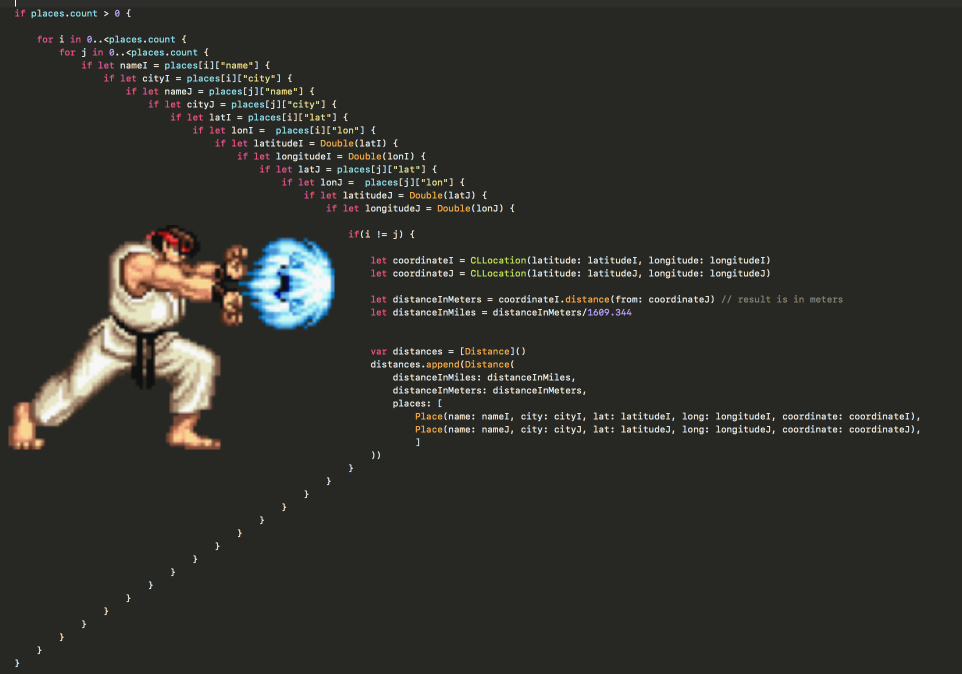
image: Eduardo Sanches Bocato, Medium
Fixing Callback Hell
- Promises
A promise is an object that represents a value that will be accessible now or later. Promises have 3 stages: pending, resolved and rejected.
const myPromise = new Promise(function(resolve, reject){
let success = true;
if (success){
resolve("Task completed");
}else {
reject("Incomplete");
}
});
Promises make code more readable by using .then() instead of callback nesting.
myPromise
.then(function(result0{
console.log(result);
});
.catch(function(error){
console.log(error);
});
If promise is resolved then .then() if rejected then .catch().
- Async/Await
A more cleaner and better way to handle asynchronous code.
Eg. console.log("hungry");
setTimeout(() => {
console.log("ate");
},2000)
console.log("happy")
When to use callbacks?
To handle asynchronous tasks
To create higher order functions
When event handling.
Avoid using callbacks in cases of nested callbacks.
Not to use when handling errors in asynchronous operations.
Not to use in cases of synchronous code to avoid unnecessary complexities.