How the Git works internally
Understanding how the Git works internally is crucial for a developer, there is no rush to become a Git expert but understanding the behind-the-scenes structure is equally important.
.git folder contains all the information that is necessary for your project in version control to function. When we initialise a repo or clone an existing one, Git creates a hidden .git folder in our project’s root directory. It includes objects, references, HEAD, index and config/logs.
GIT OBJECTS: Core components of git stored within the .git folder. Every git object uses a unique ID called SHA-1 hash based on its content and type header like “blob” or “commit”. This ID acts like a digital footprint, so any change is created in a new ID, this prevents tampering and assures that the data stays unchanged forever, the objects are then packed inside .git/objects folder using that ID for a safe storage.
(SHA-1 hash in git is a unique 40-character hexadecimal string. It labels files as blobs, trees, commits or tags so that git can find them instantly. This acts as a tamper-proof seal, meaning changing even a single letter can lead to creation of a completely different hash)
Blob Objects: store the raw content of a file. It does not contain any metadata or history(just the file data). If multiple files (having different names or present in different directories) have the same content, they will refer the same blob object.
Tree Objects: represent directory(folder) structure. It stores entries that link you to the blobs or another tree. The top-level displays the entire project state. When file changes, git makes fresh trees only for the updated part. Hashes link them immutably.
Commit Objects: immutable snapshot of a repository. They're used to save and track changes.
Tag Objects: used to mark specific points in commit objects. There are 2 types of tags: lightweight tags(bookmarks) and annotated tags(contain metadata: message, author, date, etc.). It makes the marked commits easier to find.
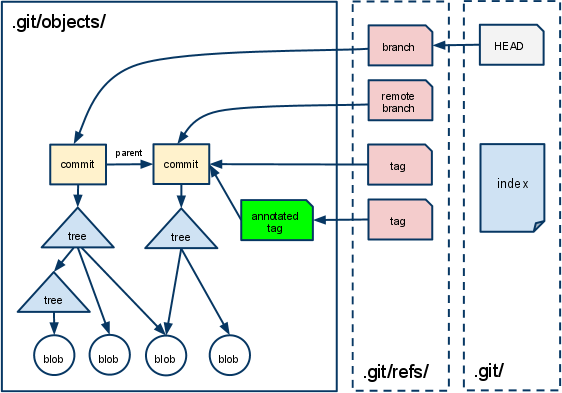
image: Rajesh Kumar, Git Tutorial: Objects, References, the Index, July 24, 2022.
Git objects, git add and git commit are fundamentally related to each other in how git tracks and stores changes in a repository.
When you modify files in your working directory, Git notices the changes but does not track them, the git add command shifts these changes into temporary storage are called the staging area or index where git snapshots these files’ state as blob. Git commit then takes everything in the staging area and permanently records it as a new object in the repository as an immutable object.