Exploring the Linux File System
Before diving deep and getting tangled in the vast file system of the Linux, let us start with what actually Linux is? Linux is an operating system, that manages your computer's hardware. It was created in 1991 by Linus Torvalds.
A few features that Linux has:
Free of cost
Open source
Highly secure, rare attacks from malware or viruses
Efficient performance
Runs on any hardware
Can run on old or low - spec machines as well
Around 96% of the world's servers run Linux
Distributions in Linux (Distros)
Different distributions are made for different purposes, these are operating systems based on Linux kernel. Users can choose distributions based on their requirement.
Linux kernel is the core of an operating system. It sits between the software and the hardware. It is the first thing that loads when the computer starts and runs until we shut the machine down. It manages system resources like CPU, RAM, disk, etc.
Popular Linux Distributions:
Ubuntu: Best for beginners and general use
Debian: Reliable for servers, it is also used as a base for other distributions
Arch Linux: For advanced users who love control
Kali Linux: Used for cybersecurity such as penetration testing, digital forensics and ethical hacking.
Fedora: Used by developers
There are over 600 Linux distributions available. These were a few popular ones.
Linux File System
The Linux File System is the way the operating system manages, stores and retrieves data from a storage device, it can be a SSD or HDD. It organises the data in a clean way so that it is easy to look for later.
Storage is divided into tiny fixed-size chunks which are called blocks, since every file is stored across one or more blocks, these blocks are used to track the files.
Every file/folder also has an inode (index node), it stores the metadata about the file not the file content. Just like a label.
LOGICAL FILE SYSTEM: Acts as an interface between the user applications and the file system. Operations like open, read, write and close are managed here. Also provides security checks such as permissions and file access control.
VIRTUAL FILE SYSTEM: Provides common interface for different types of file systems. Allows Linux to use multiple file system types at the same time. Acts as an abstraction layer sitting between applications and the actual file system, hiding the complexities of each file system.
PHYSICAL FILE SYSTEM: Directly interacts with the hardware and storage. It can be divided into separate sections and each section can have its own file system. Used to write data on the disk and retrieving it later. Basically, responsible for the low level data management.
Linux File System Structure
Linux follows a hierarchy standard to maintain its file system. It consists of a root directory ( / ) which branches into multiple sub-directories. The root directory is owned by the admin and its tightly controlled to allow only the admin to make changes to it.
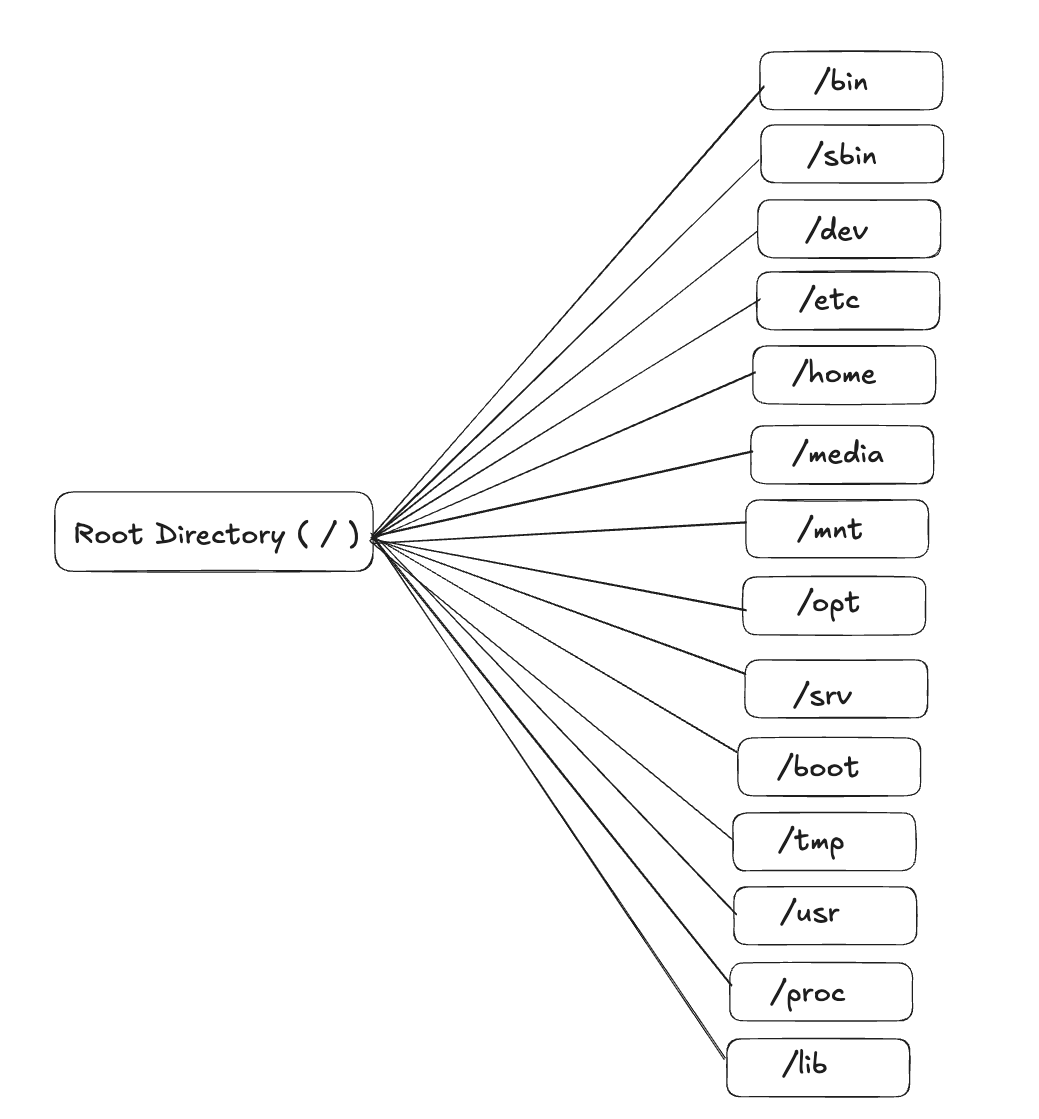
Sub- directory purpose:
/bin used to run essential commands
/sbin system/admin commands
/dev attached devices such as mouse, keyboard, etc.
/etc configuration files
/home personal folders for each user
/media directory for mounting removable devices such as usb
/mnt temporary mounting file systems
/opt optional/ third- party software
/srv data for server services
/boot kernel and bootloader files
/tmp temporary files
/usr user applications and utilities
/proc process information
/lib shared libraries
I was curious to know how /etc configures files, take /etc as the setting application but in a folder format. Every program and system service stores its configuration file here, when a service starts up it refers to /etc to know how to function. /etc can be edited and the next time new behaviour will be picked.
Fun fact! /proc does not actually exist, it is created by the Linux live in every time you boot and it shows what's happening in your running system at that moment. It is like the task manager we get on Windows, except everything is in file format. Every running program gets its ID inside /proc, but it vanishes when the program closes.
You might want to know about /boot, well I wanted to, /boot contains everything that Linux needs to run. It is like ignition of our cars, it used as a startup. You should not randomly delete files from /boot, your system will stop working! I have used the term bootloader above, it is the software. While /boot is just a folder, bootloader is the actual program that runs.
Also we all know about the environment variables, don't we? They are key=value pairs that tell programs how to behave. Linux programs can read these variables, they are generally configured /etc/environment.
File System Type in Linux:
Native Linux File Systems:
ext - extended file system
- introduced in 1992
ext2 - second extended file system
developed in 1993
non-journaling system: journaling is a safety feature that logs changes before making them, if the system crashes, data gets saved.
lightweight and simple
ext3 - third extended file system
introduced in 1999
same as ext2 but with journaling
safer than ext2
ext4 - fourth extended file system
released in 2006
journaling file system
supports large files and has unlimited sub directories
also readable by Windows and macOS
Xiafs
created as an alternative to ext2 in 1993
less reliable due to limited features and poor scalability
XFS
built for high performance and large files
journaling system
introduced in 2001
btrfs - B - tree file system
introduced in 2007
has features like: snapshots, drive pooling, data scrubbing, etc.
self healing: detects and fixes corrupt data automatically
default in Fedora Workstation
Virtual/ Special File Systems:
tmpfs - temporary file system
lives on RAM only
super fast but deleted completely when the system reboots
used for /tmp folder
profs - process file system
used for /proc folder
shows process information
live created by Linux kernel
sysfs
a pseudo file system mounted at /sys
RAM based
exports information about the kernel subsystem, CPU information, hardware devices, etc. as simple readable files
introduced to replace cluttered /proc
hardware focussed while /proc is process focussed
Other FS that Linus Supports:
NTFS
Windows default
Linux can read and write NTFS drives
VFAT/ FAT32
universally compatible
used on USB drives, SD cards
but max file size - 4 GB
exFAT
replacement of FAT32
supports files larger than 4 GB
Works across Windows, macOs and Linux
HFS + APFS
macOS file system
Linux can read HFS but APFS support is limited
How the file system is mounted onto the hierarchy?
Mounting means attaching a storage device to a folder in the file hierarchy. Without mounting, you won't be able to access any file on the Linux system.
Since we all know that Linux has one root directory and everything attaches to it, every USB must be attached to a folder inside this directory to be able to access it.
/etc/fstab file tells Linux what, where and how to mount. There is a table that describes the section, which folder will attach to it, file system type, how to mount, check for errors etc.
A Few Core Concepts of Linux - Network, Logs, Users and Security
- DNS Configuration
We are all aware that DNS is an internet phonebook that helps convert human- readable domain names into IP addresses.
Where we will find it:
/etc/resolv.conf tells Linux which DNS server to ask
/etc/hosts local manual DNS - like cache that is looked before internet
/etc/nsswitch.conf controls the order of DNS lookup
How lookup happens:
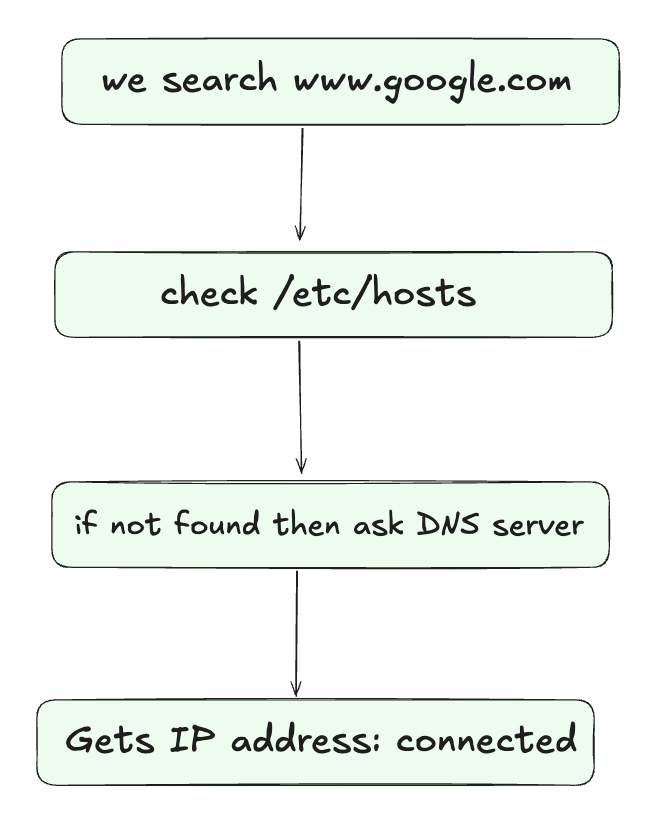
- Routing Table
Routing table tells Linux where to send the network traffic.
route command shows how the system is currently routing the network traffic. We can add or delete routes for specific destinations, whether to send to a single host or the entire network.
Use ip route to check the routing table, to see only IPv4 routes, use ip -4 route and to view only IPv6 routes, use ip -6 route.
The output will have a destination, gateway, interface and mask.
192.168.1.0 0.0.0.0 255.255.255.0 eth0 this is standard for local LAN connectivity.
- Network Configuration
Network allows computers to communicate by sending data packets between source and destination. Network configuration tells Linux how to connect to a network.
Your computer has network interface through which the computer connects to a network. ip addr show is the command to check all the interfaces with the IPs
Different Linux distros store network config differently.
- System Logs
Logs contain everything that happen on the system. They are like the black-box recorder that are there in the airplanes but for our device. When something crashes, logs tell you what and the reason behind it.
- User Management Files
Linux stores all user information in plain text files.
There are 3 core files:
/etc/passwd for user data base
/etc/shadow for password storage
/etc/group for group database
These 3 files control who and who cannot access your system.
Every file or folder in Linux asks for permissions before accessing them.
-rwxr-xr-- 1 ansh developers 4022 Apr 22 secret.sh
- is the file type (- = file, d = directory, l = link)
rwx is owner permission (read, write, execute, values are 4,2,1 respectively)
r-x is group permission
r-- is others permission
ansh is user owner
developers is group owner
Here, rwxr-xr-- will be 754
The Linux file system is not just the way of saving files but it is an architectural backbone of the complete Linux operating system. Every directory, file type, etc, has a purpose. I have tried to provide an overview of the Linux file system, I hope you guys like it.